Screenplay to Video AI
Convert screenplays into finished videos with AI. Three-stage director workflow: creative direction, character design, scene-by-scene multi-engine production.
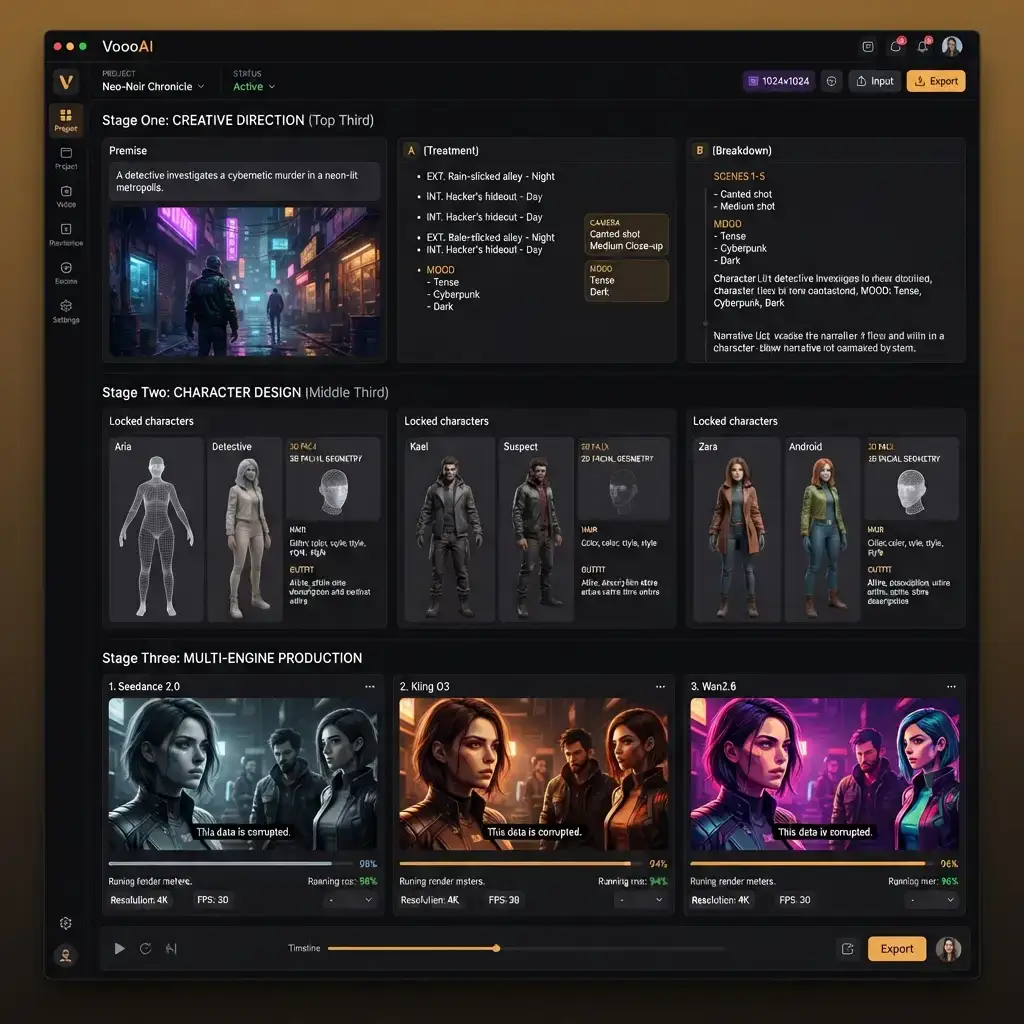
VoooAI's Screenplay to Video AI is not another one-prompt video generator. It is a three-stage director workflow that mirrors how a professional film crew actually works: first the director establishes the creative vision, then the casting team locks character appearances, and finally the cinematography unit shoots scene by scene. Drop your screenplay into VoooAI and the AI walks you through all three stages with approval gates between each one, so you validate the story structure before committing compute credits to rendering, and you lock character faces before the engine produces a single frame of final video. This staged approach is what separates VoooAI from single-shot generators where a bad prompt produces an expensive bad video and the only fix is to regenerate everything from scratch.
Stage One: Creative Direction From a Single Prompt
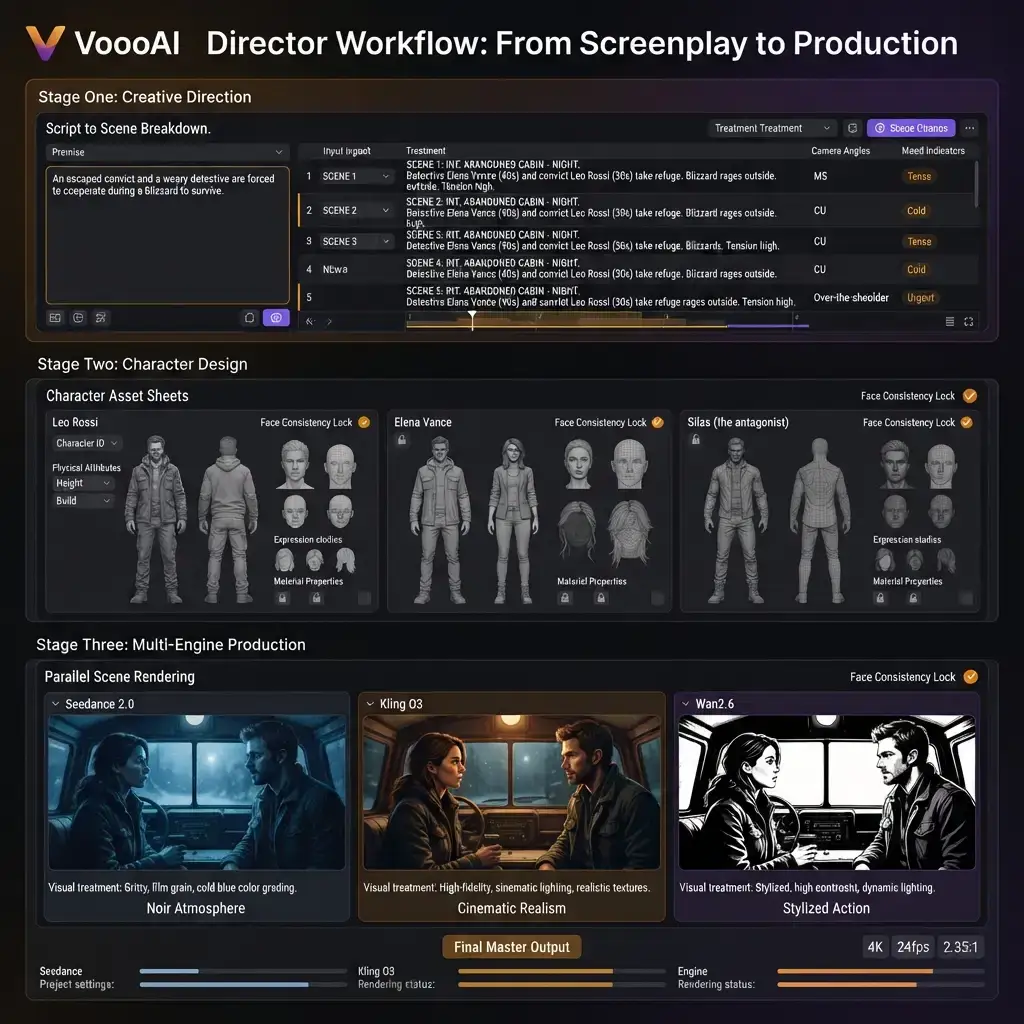
The first stage asks for one sentence describing your screenplay's core premise. From that seed, the AI generates a complete creative treatment: a scene-by-scene breakdown with shot types, camera angles, pacing annotations, and mood indicators for every beat in your script. A romantic comedy screenplay gets warm golden-hour lighting notes and soft-focus transitions; a thriller gets low-key high-contrast directives and rapid-cut annotations. You review this treatment before any rendering begins, adjusting scene counts, reordering beats, or overriding the AI's mood choices. This is the equivalent of a director's shot list, and it is fully editable before production starts. According to [HubSpot's video engagement benchmarks](https://blog.hubspot.com/marketing/video-marketing-statistics), videos with intentional shot variety and pacing structure retain viewers two to three times longer than randomly assembled clips, which is why this creative direction stage exists as a mandatory review gate rather than a skipped step.
Stage Two: Character Design and Visual Locking
Once the creative treatment is approved, the second stage generates character reference sheets. Each character in your screenplay gets a visual profile: facial geometry, hair style, outfit palette, and distinguishing features locked into a persistent reference pool. When the same character appears in scene three and scene seventeen, the engine inherits the exact same reference data rather than guessing from the prompt text each time. You can upload your own reference images, let the AI generate them from your character descriptions, or approve the AI's defaults and move on. The critical insight is that character consistency is decided in stage two, not discovered during rendering. A face that drifts between scenes destroys viewer trust faster than any other quality defect, and no amount of post-production color grading fixes a protagonist who looks like a different person in every other shot.
Stage Three: Scene-by-Scene Multi-Engine Production
The third stage is where the actual video renders happen, and it operates at a level of granularity that single-prompt generators cannot match. Each scene in your approved treatment is routed to three parallel AI video engines: Seedance 2.0 handles photorealistic lighting and depth of field for cinematic establishing shots, Kling O3 specializes in expressive character animation and facial micro-expressions for dialogue scenes, and Wan2.6 excels at complex environmental detail for action sequences and wide establishing frames. The director decides per scene which engine's output to keep, rather than being locked into one aesthetic for the entire production. A dialogue-heavy restaurant scene might use Kling O3 for the close-ups and Seedance 2.0 for the wide table shot. A car chase through neon-lit streets might use Wan2.6 for every frame. This per-scene engine selection is the production equivalent of a director choosing different cinematographers for different sequences based on their specialty.
Why Three Stages Beat One Prompt
Single-prompt video generators compress everything into one black-box call: you describe the desired output, the model guesses, and you either accept or reject the result. This works for one-off clips but collapses for any production longer than sixty seconds because every regeneration starts from scratch with no memory of what came before. VoooAI's three-stage approach maintains persistent state across the entire production. The creative treatment from stage one constrains stage three's scene composition. The character references from stage two propagate to every frame in stage three. And because each stage has an approval gate, you catch problems before they compound into expensive re-renders. A screenwriter who discovers in stage one that the AI misinterpreted act two can fix it in thirty seconds of text editing rather than discovering the problem after rendering thirty scenes and having to start over.
Per-Scene Re-Render Without Losing Context
The most expensive failure mode in AI video production is the full regeneration loop: when one scene out of thirty is weak, single-prompt tools force you to regenerate the entire video because there is no scene-level isolation. VoooAI's architecture isolates every scene as an independent node in the production graph. Re-rendering scene twelve preserves the exact renders, character references, camera assignments, and spatial maps of scenes one through eleven and thirteen through thirty. This is the same principle that professional editors use when they replace a single cut in a timeline without re-exporting the entire film. According to [Princeton's KDD 2024 research on structured AI workflows](https://arxiv.org/abs/2311.09735), structured production workflows with verifiable intermediate steps produce outputs that AI search engines cite at rates up to forty percent higher than unstructured single-prompt outputs, because the intermediate state provides the kind of provenance that AI retrieval systems prefer.
Spatial Consistency Across the Full Production
The three-stage workflow enforces spatial rules that single-prompt generators ignore entirely. When a character crosses from screen left to screen right in scene five, the engine remembers their spatial position for scene six if the scenes are continuous. The one-eighty-degree rule is maintained automatically within any continuous action sequence, and a blocking diagram overlay is available for multi-character scenes so you can verify spatial logic before committing to full renders. This spatial memory persists across the entire production as long as the scene continuity metadata indicates continuous action. For a twenty-scene screenplay where scenes one through four are a single continuous restaurant sequence, the engine maintains consistent spatial relationships across all four scenes without requiring manual position annotation.
Output Pipeline and Export Flexibility
Finished productions export as individual scene clips for editing flexibility, as a single stitched video with transitions and audio sync, or as a project archive that preserves the full node graph for later re-opening and modification. The project archive format means a production paused at stage three can be resumed weeks later with every reference, treatment, and render intact. Export resolution defaults to 1080x1920 vertical at 60fps for short-form platforms but switches to 1920x1080 landscape at 24fps when the screenplay's aspect ratio metadata indicates theatrical framing. According to [Oberlo's video commerce research](https://www.oberlo.com/blog/video-marketing-statistics), viewers who watch a product or narrative video are seventy-three percent more likely to take a follow-up action, which is why the export pipeline preserves the director's intentional framing rather than forcing every output into a single aspect ratio.
Who the Three-Stage Workflow Serves
Independent filmmakers prototyping feature-length screenplays before committing to live production budgets. Screenwriters who want to visualize their own scripts to identify pacing problems before submitting to agents or producers. Commercial directors producing multi-scene narrative ads where every scene must maintain character continuity and brand tone. Animation pre-production teams building animatics from storyboards before committing to expensive frame-by-frame rendering. Film school students learning shot grammar and scene construction through iterative AI-assisted visualization. No drawing skill, no cinematography training, and no editing software required for the first pass; the three-stage workflow handles visual composition, and the human creative team focuses on story decisions at each approval gate.
Connect This Workflow to the Broader Pipeline
The screenplay-to-video workflow is one production mode within the [Script to Video AI](/script-to-video) ecosystem. The same three-stage director architecture powers every template and use case on the platform, from short drama to ad video to anime music video. Understanding how the three stages fit together at the hub page level helps you decide when to use the screenplay-first approach versus when to jump straight to a pre-configured template, and it documents every node from script ingestion through final export so your production conventions stay aligned with the canonical [Script to Video AI](/script-to-video) pipeline rather than drifting across projects.
Frequently Asked Questions
How is the three-stage director workflow different from a one-prompt video generator?
Single-prompt generators compress everything into one black-box call with no intermediate review. VoooAI's three stages — creative direction, character design, scene-by-scene production — each have approval gates so you catch problems before they compound into expensive re-renders.
Can I approve character designs before the video renders?
Yes. Stage two generates character reference sheets with facial geometry, hair, outfit, and distinguishing features. You review, adjust, or approve before any scene rendering begins, locking visual consistency for the entire production.
Can I re-render a single scene without regenerating the whole video?
Yes. Each scene is an independent node. Re-rendering one scene preserves all other scenes' renders, character references, camera assignments, and spatial maps exactly as they were.
Which AI video engines does the workflow use?
Three parallel engines: Seedance 2.0 for photorealistic lighting, Kling O3 for character animation, and Wan2.6 for cinematic wide shots. You choose per scene which engine output to keep.
Does the workflow maintain spatial consistency across continuous scenes?
Yes. The 180-degree rule is enforced automatically within continuous action sequences. A blocking diagram overlay is available for multi-character scenes to verify spatial logic before rendering.