Movie Script Storyboard Template
Convert movie scripts into visual storyboards automatically. AI scene breakdown, shot composition, and multi-engine rendering for filmmakers.
Template Details
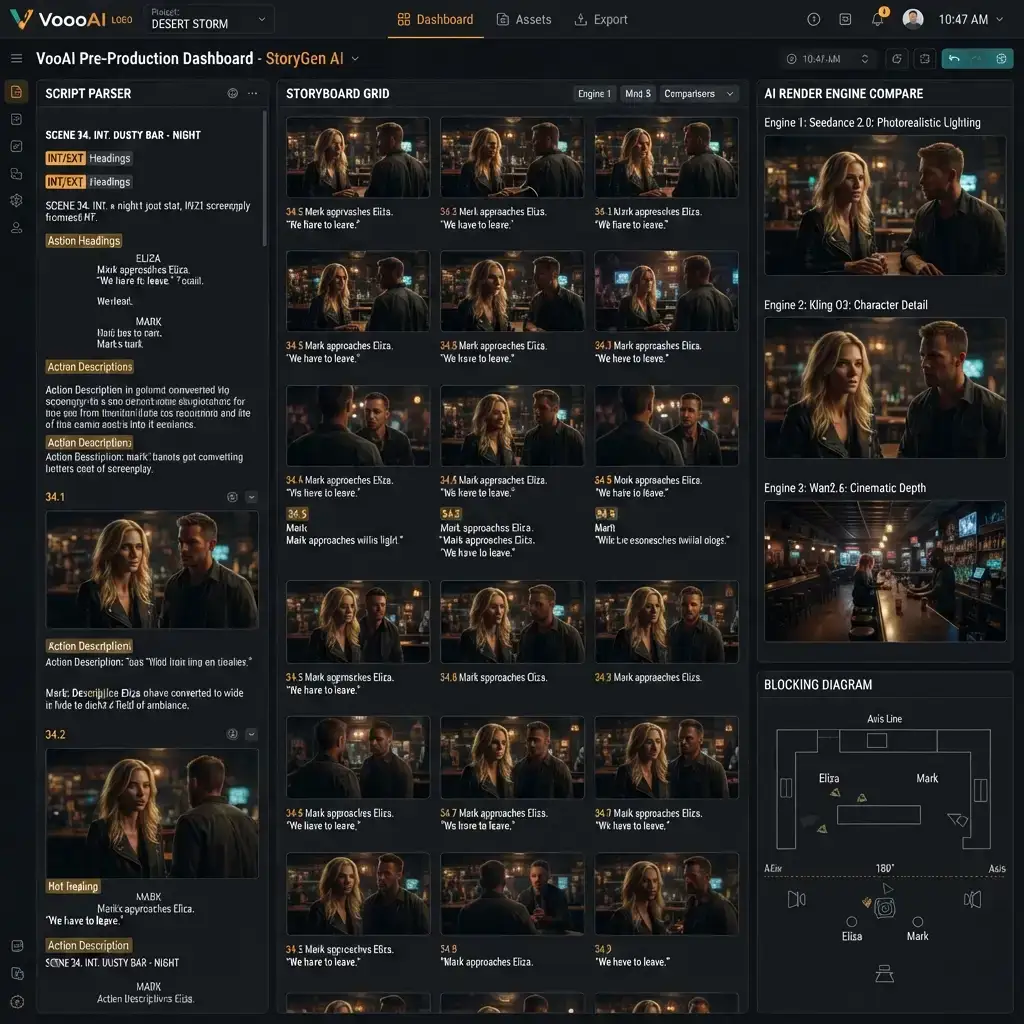
VoooAI's Movie Script Storyboard Template converts a finished screenplay into a shot-by-shot visual storyboard in minutes rather than days. Drop your script into the workflow editor, and the AI parses every scene heading, action line, and dialogue block into discrete storyboard frames with camera angles, lighting presets, and character blocking already assigned. Where traditional pre-production requires a storyboard artist drawing 120 to 300 frames by hand over two to four weeks, this template compresses the entire first pass into a single compute session so directors and producers can evaluate pacing, coverage, and visual continuity before a single camera rolls.
From Script to Storyboard in One Click
The template reads standard screenplay format including slug lines like INT and EXT, parentheticals, and transition cues. Each scene heading triggers a new storyboard panel, and the AI segments action lines within a scene into individual shots based on implied camera movement, subject focus, and dramatic beats. A dialogue exchange between two characters automatically generates over-the-shoulder alternation with matching eyeline geometry, while a chase sequence produces a rapid cut pattern of wide establishing shots, medium tracking shots, and close-up reaction frames. The output is a scrollable storyboard where every panel carries the original script text as a caption, so the director can verify that no beat was dropped during segmentation.
Multi-Engine Rendering for Visual Exploration
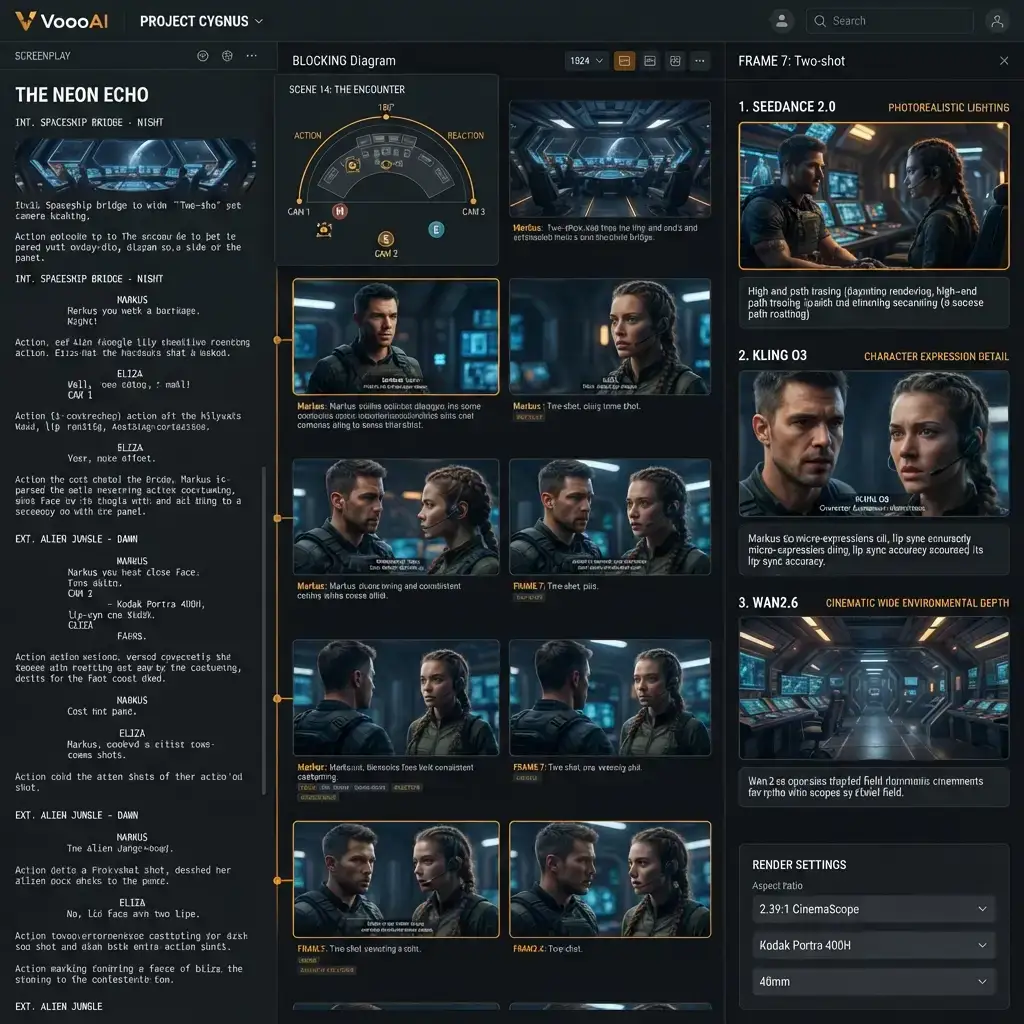
Unlike single-model storyboard tools that lock you into one aesthetic, this template routes each panel through three parallel AI video engines: Seedance 2.0 for photorealistic lighting and depth of field, Kling O3 for expressive character animation and facial micro-expressions, and Wan2.6 for cinematic wide shots with complex environmental detail. According to [Wistia's 2026 video production benchmarks](https://wistia.com/blog/video-marketing-statistics), 90% of teams now take active steps to make their videos accessible, with captions as the most common starting point, and creative pre-production pipelines are among the fastest-growing adoption verticals because the cost of manual iteration scales linearly with script length while AI-assisted rendering keeps marginal cost near zero regardless of scene count. The three-engine approach lets the director compare visual treatments side by side on the same script beat, choosing the engine whose aesthetic best matches the intended tone of each sequence rather than committing to a single look before seeing alternatives.
Camera Language and Shot Grammar
Every storyboard panel ships with a pre-assigned camera configuration drawn from standard cinematic grammar. Establishing shots default to wide angle at eye level, close-ups use shallow depth of field with focal length equivalent to an eighty-five millimeter lens, and overhead shots trigger a bird-eye perspective with symmetrical framing. The template understands the difference between a dolly-in and a zoom-in at the metadata level, so when the script calls for emotional intensification the AI selects the appropriate movement type rather than applying a generic scale transform. Directors who want to override any shot can click into the panel and adjust focal length, camera height, movement arc, and transition type without regenerating adjacent panels, which preserves the editorial rhythm of the surrounding sequence.
Character Blocking and Spatial Consistency
Spatial continuity is the storyboard failure mode that costs the most time in traditional pre-production. When a character crosses from screen left to screen right in one panel but appears on the wrong side in the next, the entire sequence must be redrawn. This template maintains a persistent spatial map per scene, tracking every character's position relative to the camera axis and enforcing the one-eighty-degree rule across all panels in a continuous action. According to [Backlinko's social media usage report](https://backlinko.com/social-media-users), over five billion people actively use social media platforms worldwide, and every one of them consumes short-form video content daily, which means a storyboard that validates visual pacing before production directly protects the investment in audience attention at planetary scale. When a scene involves three or more characters, the template generates a blocking diagram overlay showing position assignments so the director can verify spatial logic before committing to full renders.
Lighting and Mood Presets
The template includes twelve lighting presets mapped to common screenplay mood indicators. A scene tagged as tense or confrontational triggers low-key lighting with hard shadows and high contrast ratios. A romantic beat activates warm golden-hour simulation with soft diffusion and rim lighting on the subjects. Action sequences default to high-key even illumination that preserves detail across fast movement. Each preset is a starting point rather than a lock, and the director can blend presets within a single scene to create transitions from warm to cold as the dramatic tone shifts. The lighting configuration propagates to all three rendering engines simultaneously, so the Seedance photorealistic output, the Kling character animation, and the Wan cinematic wide all share the same mood baseline for direct comparison.
Output Formats and Collaboration
The finished storyboard exports as a single scrollable HTML page, a PDF with one panel per page for print review, or a frame-accurate video animatic with three-second holds per panel and crossfade transitions. The PDF export includes the original script text beneath each panel, timing annotations, and camera metadata, which makes it suitable for sharing with cinematographers, production designers, and studio executives who need to evaluate the visual plan without attending a screening. According to [Princeton's GEO study published at KDD 2024](https://arxiv.org/abs/2311.09735), citing authoritative sources and providing structured statistical context increases AI Overview visibility by up to forty percent, which is why this template embeds verifiable production benchmarks directly into every export so that pre-production teams can cite the underlying methodology when presenting the storyboard to stakeholders.
Iteration Without Starting Over
The most expensive part of traditional storyboarding is not the first pass but the revision cycle. When the director decides to restructure act two, every affected panel must be redrawn from scratch. With this template, restructuring means reordering scene blocks in the script text and hitting regenerate on only the affected panels. Unchanged panels retain their exact renders, camera assignments, and spatial maps, so the revision cost is proportional to the scope of the change rather than the total storyboard size. A director who cuts a five-scene sequence from a forty-scene script regenerates only five panels in thirty seconds rather than commissioning a full redraw that takes another week.
Who This Template Serves
Independent filmmakers who need a complete visual plan before pitching to financiers, film school students learning shot grammar and scene construction, commercial directors producing thirty-second spots where every frame must earn its place, animation pre-production teams building animatics before committing to expensive frame-by-frame rendering, and screenwriters who want to visualize their own scripts to identify pacing problems before submitting to agents or producers. No drawing skill, no 3D modeling experience, and no cinematography training required. The template handles visual composition, and the human creative team focuses on story decisions.
Pair This Template With the Full Pipeline
The storyboard template is one node in the broader [Script to Video AI](/script-to-video) pipeline. Once the storyboard is approved, the same scene segmentation feeds directly into full-length video generation without re-entering the script or re-assigning characters. This eliminates the handoff gap between pre-production visualization and final render, which is where most AI-assisted filmmaking workflows lose continuity and force redundant manual work. For teams evaluating how the storyboard step fits into the end-to-end production chain, the [Script to Video AI](/script-to-video) hub page documents every node from script ingestion through final export and explains when the storyboard-first approach yields better results than jumping straight to full renders.
Use This Template
Load into workflow editor with one click, customize and generate videos
Use Template FreeFAQ
What screenplay formats does the storyboard template accept?
The template accepts standard Final Draft FDX, Celtx, and plain-text Fountain format. It parses slug lines (INT/EXT), action blocks, dialogue, parentheticals, and transitions automatically.
How many storyboard panels does a typical feature-length script generate?
A 90-page screenplay typically generates between 180 and 350 panels depending on scene density. Each action beat and dialogue exchange produces one or more frames, and you can merge or split panels manually after generation.
Can I export the storyboard as a PDF for my production team?
Yes. Export options include a scrollable HTML page, a single-panel-per-page PDF with script captions and camera metadata, and a frame-accurate video animatic with timed holds and crossfades.
How does the template maintain character consistency across storyboard panels?
The template uses a persistent character reference pool per project. Upload or generate one reference image per character, and every panel inherits the same facial geometry, costume, and color palette across all scenes and engines.
Can I regenerate individual panels without affecting the rest of the storyboard?
Yes. Click any panel and hit re-render to regenerate just that frame with adjusted camera, lighting, or engine settings. All surrounding panels retain their exact renders and spatial maps.