Automate Your YouTube Shorts Production Workflow
Automate YouTube Shorts production with scene-aware reframing, multi-engine rendering, and locked character consistency.
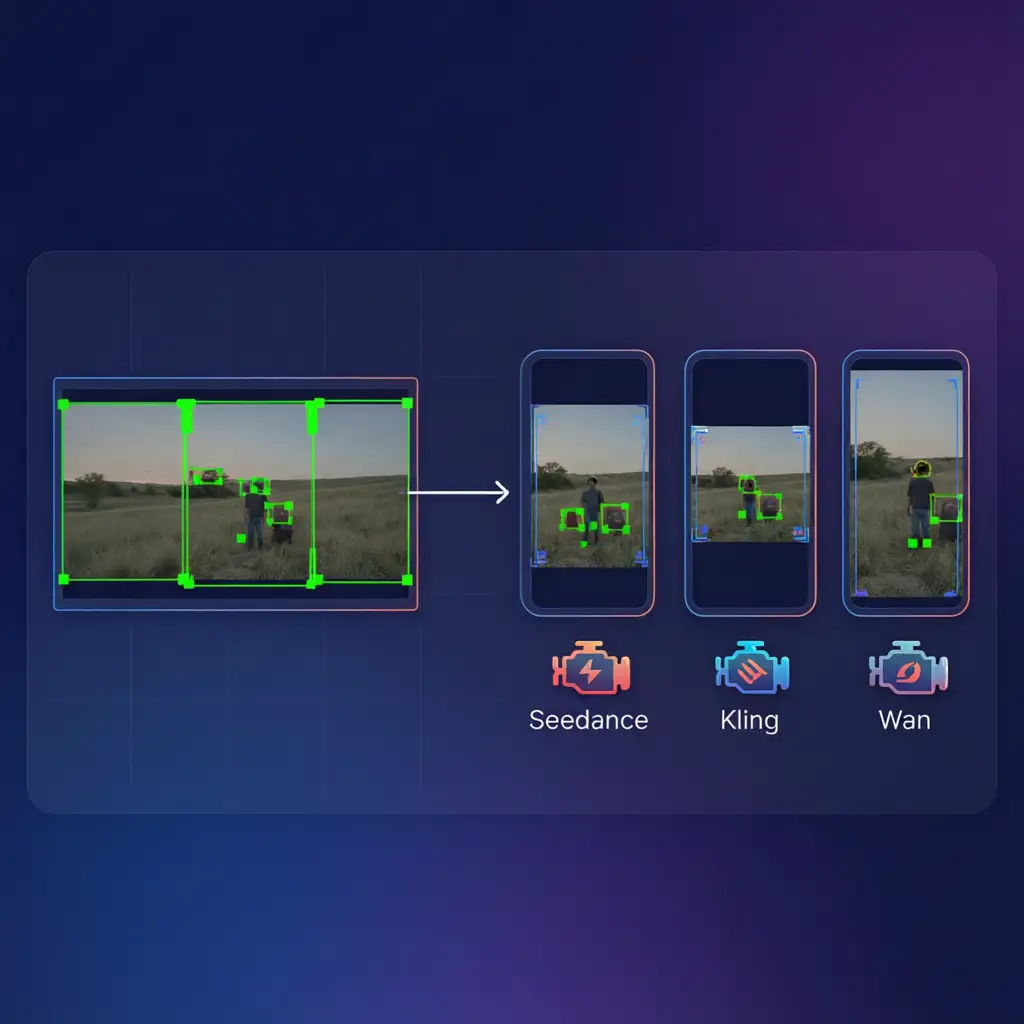
VoooAI's workflow canvas for YouTube Shorts production solves a problem that every long-form creator faces: you have hours of horizontal footage sitting on your drive, and you need to extract dozens of vertical 9:16 Shorts from it without spending an equal amount of time re-editing everything from scratch. Traditional clip-extraction tools like Opus Clip, Pictory, or Vizard perform a single-pass center-crop reframing that blindly trims the left and right edges of your frame. The result is frequently unusable: a two-person interview becomes a tight headshot of whoever sits on the left; a product demo loses the hands and the product simultaneously; a travel vlog's sweeping landscape is reduced to an unrecognizable sliver. VoooAI takes a fundamentally different approach. The canvas begins with a full scene-aware analysis of your source footage. It identifies every scene boundary, detects the primary subject in each frame using object and face tracking, classifies the shot type (talking-head, action sequence, panoramic B-roll, product close-up, multi-person dialogue), and then generates an intelligent reframing map that determines exactly how to crop each 16:9 segment into a 9:16 vertical output without losing the content that matters. This is not a static template applied uniformly across the entire video. It is a per-scene, per-shot adaptive reframing decision that respects the compositional intent of the original footage while optimizing for the vertical consumption pattern that YouTube Shorts rewards.
The Three-Engine Parallel Rendering Pipeline
Once the reframing map is built, the canvas routes each classified segment to one of three specialized AI rendering engines. Seedance 2.0 handles motion-heavy cuts: action sequences, transitions, and any scene where subject velocity exceeds a configurable threshold. Kling O3 takes talking-head segments: interviews, narrations, and direct-to-camera addresses where facial expression fidelity and lip-sync accuracy are paramount. Wan2.6 covers panoramic B-roll and establishing shots where spatial breadth must be preserved even within a vertical crop. All three engines run in parallel on shared 24GB VRAM hardware, and the canvas orchestrates load balancing so that a batch of 20 Shorts derived from a single 45-minute podcast episode completes in roughly the same wall-clock time as a single engine would need for five clips. The locked character sheet system ensures that your host, guests, or on-screen talent maintain identical facial geometry, wardrobe, and color grading across every Short in the batch, regardless of which engine rendered the clip. This cross-clip character persistence is the single most important factor for audience recognition in serialized Shorts content, and it is entirely absent from single-engine competitors.
Engine Failover and Per-Clip Retry
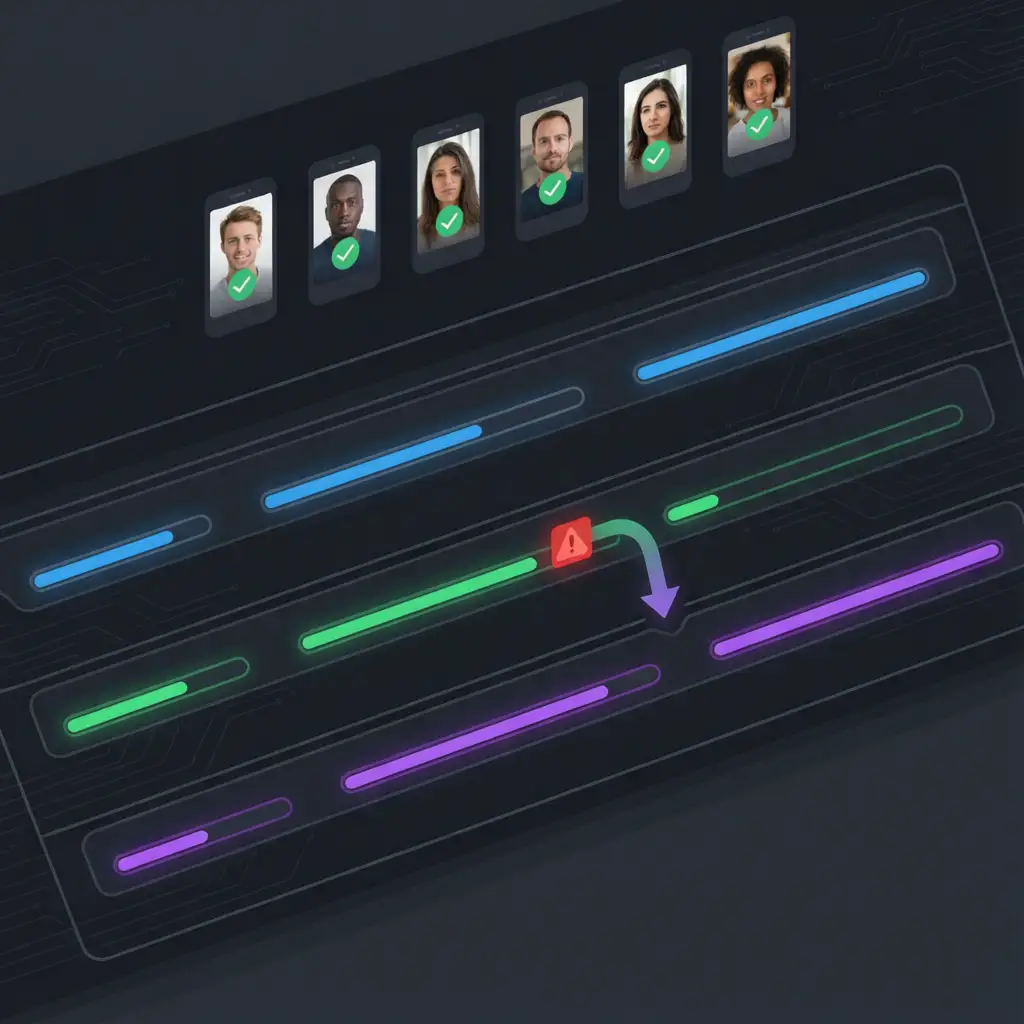
General-purpose automation platforms like Zapier or n8n can glue together API calls to different video services, but they have no concept of engine-level failover. If one engine times out or produces a degraded output, the entire batch stalls or ships with a visible quality drop. VoooAI's canvas implements automatic engine failover: if Seedance 2.0 encounters a scene it cannot handle within quality thresholds, the canvas seamlessly reroutes that segment to Kling O3 or Wan2.6 without interrupting the batch. Per-clip retry goes further: when a single Short in a batch of 20 fails a quality check, the canvas re-renders only that clip, preserving the 19 that already passed. This is critical for production workflows where you need predictable output quality and cannot afford to regenerate an entire batch because of one bad frame. According to [Runway ML's video generation technology research](https://research.runwayml.com/) demonstrates that controllable AI video generation with temporal consistency across frames enables production pipelines to maintain visual coherence during automated scene transitions and multi-engine routing. [Mordor Intelligence's workflow automation adoption forecast](https://www.mordorintelligence.com/industry-reports/workflow-automation-market) projects the workflow automation market to grow from $24.5B (2024) to $45.2B (2033) at a 7.1% CAGR, with AI-powered platforms leading adoption across content production verticals. [Precedence Research's AI-driven automation market data](https://www.precedenceresearch.com/workflow-automation-market) projects the global workflow automation market to reach $98B by 2033 (from ~$54B in 2024, CAGR 6.2%), with AI-driven video production tooling as the primary growth driver.
Who This Is For
YouTube creators producing long-form content (podcasts, tutorials, reviews, vlogs) who need a systematic pipeline for extracting Shorts without manual re-editing. MCN agencies managing multiple creator accounts who need to produce 50-100 Shorts per day across their roster. Brand marketing teams repurposing webinar recordings, conference talks, and product launch videos into a steady stream of Shorts for organic reach. Educational content producers converting lecture recordings into bite-sized vertical clips for YouTube's algorithm. Podcasters who record in horizontal format but need vertical Shorts to drive discovery and subscriber growth. The common thread is volume: anyone who needs to produce Shorts at a cadence that manual editing cannot sustain will benefit from the automation canvas.
Batch Processing at Scale
The canvas supports batch ingestion of multiple source videos simultaneously. Upload ten 30-minute podcast episodes and the canvas will analyze all of them in parallel, build reframing maps for each, classify segments across the entire batch, and route everything through the three-engine pipeline. The output is a structured library of Shorts, each tagged with metadata (source episode, timestamp, segment type, engine used, quality score), ready for review and scheduling. Internal benchmarks on a 45-minute podcast episode: the canvas produces 18-22 publishable Shorts in approximately 35 minutes of compute time. A human editor working the same footage manually would need 6-8 hours to produce a comparable set, and even then would lack the cross-clip character consistency that the locked sheet provides automatically. For agencies managing ten or more creator accounts, this throughput differential is the difference between hiring a full editing team and running the canvas on a single workstation.
Implementation Best Practices
Start with a single source video and review the canvas's reframing decisions before scaling to batch mode. The scene classification and subject detection are highly accurate but benefit from human review on your first run, particularly if your footage has unusual lighting, rapid scene changes, or non-standard aspect ratios. Once you are confident in the output quality, switch to batch mode and process your entire content library. Establish a publishing cadence: most successful Shorts creators post 2-3 per day per channel, which means a single 45-minute episode provides roughly a week of daily content. For multi-channel strategies, the same source footage can produce different Short selections for each channel, with the canvas generating unique reframing maps optimized for each channel's audience profile. The [best workflow automation software for AI video](/workflow-comparison) comparison page provides a detailed breakdown of how VoooAI's canvas compares to other automation solutions across the full production pipeline, and the [Script to Video AI](/script-to-video) hub page explains the underlying node architecture that powers every automated Short on the platform. For creators evaluating multi-platform strategies, the [workflow comparison](/workflow-comparison) matrix is the canonical reference for understanding which automation approach delivers the best ROI across YouTube Shorts, TikTok, and Instagram Reels simultaneously.
Frequently Asked Questions
How does VoooAI's YouTube Shorts automation differ from tools like Opus Clip or Pictory?
Opus Clip and Pictory perform single-pass center-crop reframing that blindly trims frame edges. VoooAI uses scene-aware intelligent reframing with per-shot adaptive cropping, three parallel rendering engines (Seedance 2.0, Kling O3, Wan2.6), and locked character sheets that maintain cross-clip consistency.
How many YouTube Shorts can VoooAI produce from a single long-form video?
A typical 45-minute podcast episode yields 18-22 publishable Shorts in approximately 35 minutes of compute time. A human editor would need 6-8 hours to produce a comparable set manually, without cross-clip character consistency.
What is the engine failover mechanism in VoooAI's workflow canvas?
If one rendering engine (e.g., Seedance 2.0) encounters a scene it cannot handle within quality thresholds, the canvas automatically reroutes that segment to another engine (Kling O3 or Wan2.6) without interrupting the batch. Per-clip retry re-renders only failed clips while preserving all passing outputs.
Can I use VoooAI's canvas for multi-channel YouTube Shorts strategies?
Yes. The same source footage can produce different Short selections for each channel, with unique reframing maps optimized for each channel's audience profile. The canvas supports batch ingestion of multiple source videos and outputs a structured library tagged with metadata for scheduling.
What types of long-form content work best with VoooAI's Shorts automation?
Podcasts, tutorials, product reviews, vlogs, webinar recordings, conference talks, educational lectures, and product launch videos all work well. The canvas excels with talking-head content, multi-person dialogues, product demonstrations, and scenic B-roll — any format where intelligent subject tracking and scene classification add value over simple center-cropping.