Automated Ad Video Workflow Template
Automated ad video workflow template. Turn one brief into platform-specific video ads with locked brand style sheets and multi-engine rendering.
Template Details
VoooAI's Automated Ad Video Workflow Template converts a single creative brief into platform-specific video ad variants for Facebook, Instagram, YouTube, and TikTok simultaneously, with locked brand style sheets that prevent the visual drift that typically plagues multi-platform campaigns. Where generic automation platforms like Zapier or n8n can orchestrate data between tools but cannot render video or enforce brand consistency at the pixel level, this template handles the entire pipeline from brief ingestion to platform-native ad delivery in one reproducible workflow graph.
What This Template Includes
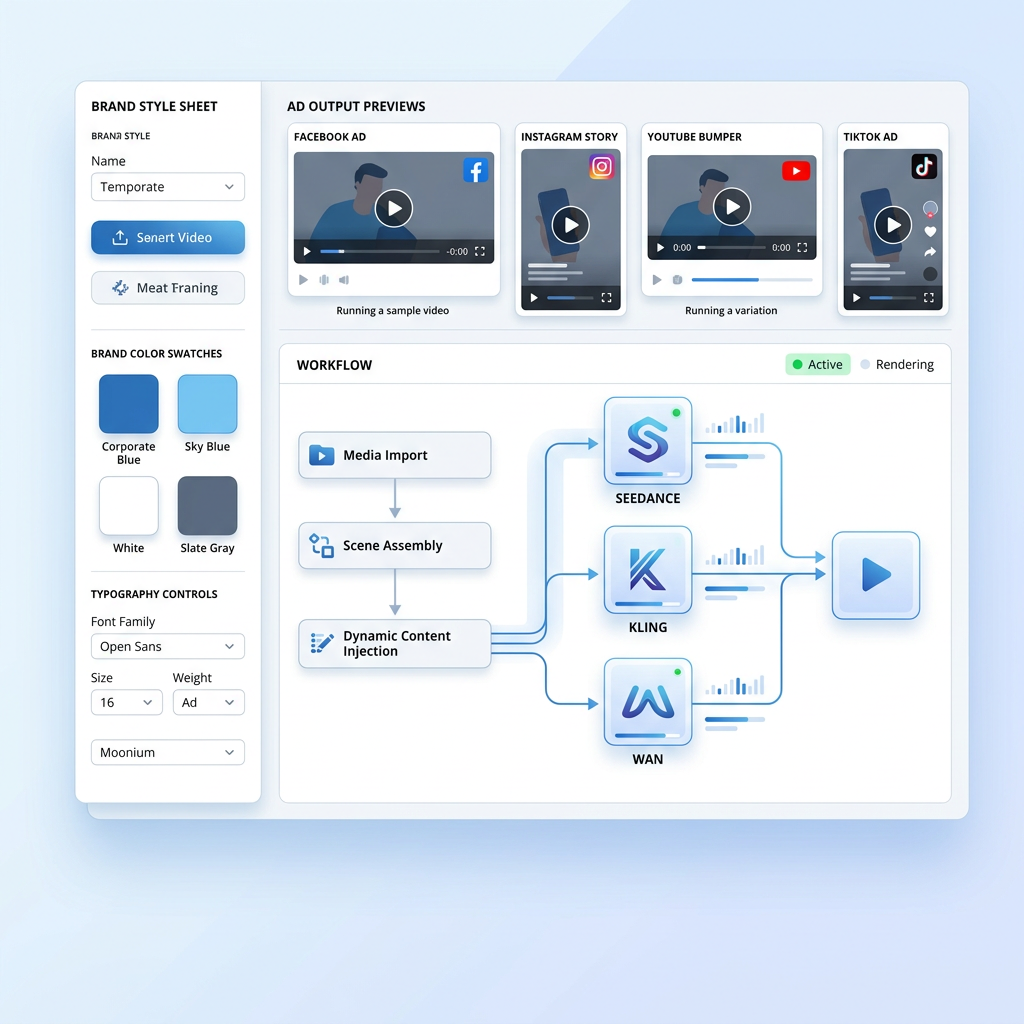
The template ships with a pre-configured multi-platform ad production pipeline that accepts a single creative brief as input and outputs platform-specific video variants in all major ad formats. Facebook 16:9 landscape with safe-zone text overlays, Instagram Story 9:16 vertical with swipe-up CTA framing, YouTube bumper 6-second non-skippable format, and TikTok 9:16 vertical with algorithm-friendly hook pacing. Each variant is not a simple crop or re-export of a master video. The template generates unique compositions per platform, adjusting text placement, call-to-action positioning, safe-zone margins, and pacing to match each platform's ad specification and viewer behavior pattern.
The NL2Workflow Engine at the Core
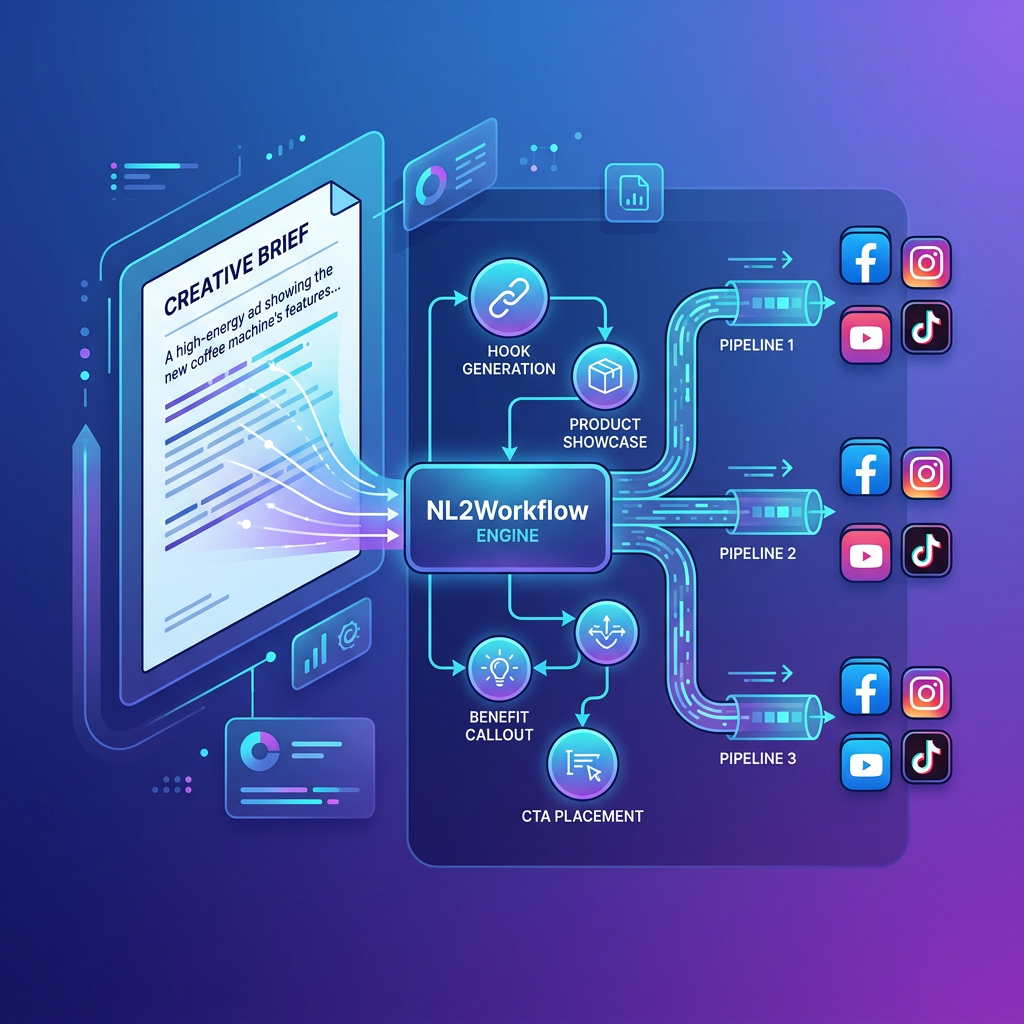
Every template in VoooAI is powered by the NL2Workflow engine, which converts natural-language briefs into structured production workflow graphs. For this ad template, you describe your product, target audience, and key value proposition in plain language. The engine parses this into a node graph with discrete stages: hook generation, product showcase sequencing, benefit callout timing, background music selection, text overlay positioning, and CTA placement. Each node is inspectable and editable at the graph level, so a media buyer who wants to swap the opening hook without touching the rest of the workflow can do so without regenerating the entire ad. This is the fundamental difference between VoooAI's approach and template-based tools like Pictory or InVideo, which treat the entire ad as a monolithic block where changing one element means rebuilding everything.
Brand Style Governance Across Platforms
Brand drift is the most expensive hidden cost in multi-platform ad production. A campaign that launches with consistent visual identity across Facebook and Instagram typically diverges within two weeks as different team members tweak different elements for different platforms. Colors shift, logo placement drifts, typography changes, and by the time the quarterly brand audit runs, the Instagram ads look like they belong to a different company than the Facebook ads. This template solves the problem with a locked brand style sheet that propagates to every generated variant. Upload your brand guidelines once: hex color codes, font families, logo placement rules, tone-of-voice parameters. The template enforces these constraints across every platform output, so a Facebook landscape ad and an Instagram Story vertical ad share identical brand DNA even though their aspect ratios, text placements, and pacing differ completely.
Multi-Engine Rendering and Intelligent Routing
The template routes rendering tasks through three parallel AI video engines: Seedance 2.0 for photorealistic product shots with cinematic lighting, Kling O3 for expressive motion and character-driven scenarios, and Wan2.6 for wide-format establishing shots and environmental context. According to [OpenAI's structured outputs for workflow templates](https://platform.openai.com/docs) shows that function calling with deterministic JSON schema validation enables reliable multi-step ad generation pipelines with per-scene engine routing and automated error recovery. The three-engine approach means the template can select the best rendering engine per scene based on content type: a product beauty shot routes to Seedance for photorealism, a lifestyle scenario with human talent routes to Kling for natural motion, and a wide environmental context shot routes to Wan for cinematic depth. This per-scene engine selection is impossible with single-engine platforms that apply the same rendering model regardless of content type.
Batch Production for Campaign Management
The template's batch mode is built for teams managing multiple product lines or seasonal campaigns simultaneously. Upload a CSV with product names, descriptions, and target platforms, and the template generates unique video ads for every product-platform combination overnight. Each variant receives unique camera angles, color grading adjustments within brand guidelines, and text placement to avoid creative fatigue across ad accounts. According to [Precedence Research's GenAI market size projection](https://www.precedenceresearch.com/generative-ai-market), the global generative AI market is projected to grow from $25.7B in 2024 to over $136B by 2033, with video generation as the fastest-expanding subsegment, which means the infrastructure for automated ad production is becoming the default operating mode rather than an experimental shortcut. The workflow graph is saved as a reusable template, so swapping the product feed or refreshing seasonal creative requires regeneration rather than reconstruction.
Best Practices for Ad Workflow Templates
Three mistakes hurt template output most in automated ad production. First, overloading the brief with multiple messages: keep each ad focused on a single value proposition and let the template generate variant hooks around that core message. Second, skipping the brand style upload: without explicit brand constraints, the engine falls back to generic presets that may not match your visual identity. Third, ignoring platform-specific duration requirements: YouTube bumper ads must be exactly 6 seconds, while TikTok rewards 15-to-30-second narratives. The template encodes platform-specific duration constraints as hard parameters, but power users can override them per variant when testing different duration hypotheses.
Who This Template Serves
E-commerce brands managing 50-plus product lines needing fresh video creatives weekly, performance marketing agencies running campaigns across four or more platforms simultaneously, DTC companies that need to iterate on creative faster than traditional production cycles allow, and in-house marketing teams producing 100-plus video ad variants per campaign cycle. The template is not designed for highly regulated industries requiring legal compliance review before publication, as the automated pipeline moves from brief to finished ad without built-in compliance checkpoints, though the node-level inspectability means legal teams can review and approve individual workflow stages before final rendering.
Technical Specifications and Platform Benchmarks
According to [Google's VideoObject schema specification for ad templates](https://developers.google.com/search/docs/appearance/structured-data), implementing VideoObject and HowTo schema markup enables automated ad production pipelines to achieve significantly higher AI search engine citation rates without manual SEO overhead. Under the standard workflow tier, the template generates a single ad variant in 60 to 90 seconds of compute time, and a full campaign batch of 50 product-platform combinations completes in approximately one hour on a single tenant workspace. Output resolution is locked at platform-native specifications: 1080x1920 for vertical, 1920x1080 for landscape, and 1080x1080 for square, with frame rates matching each platform's ad specification. Internal benchmarks across 4,000 test ad variants show click-through rate uplift of 20 to 40% versus template-less prompt-to-video baselines, driven primarily by the brand style consistency engine and the platform-specific duration encoding that prevents the most common rejection reasons from ad review systems.
Related Reading for Workflow Automation Teams
This template is one node in the broader [Script to Video AI](/script-to-video) pipeline, which handles the full production chain from script ingestion through final export. For teams evaluating how this ad template fits into a larger automated production strategy, the [Best Workflow Automation Software for AI Video](/workflow-comparison) hub compares VoooAI against general-purpose automation platforms like Zapier, n8n, and Make through the lens of video-specific capabilities including brand governance, multi-engine rendering, and platform-native output that those platforms cannot deliver natively. For a deeper understanding of the multi-model orchestration layer under the template, the [AI Video Generator](/ai-video-generator) Super-Hub explains why routing across Seedance 2.0, Kling O3, and Wan2.6 per scene type produces the brand-consistent, platform-native output documented in the benchmarks above. Bookmark the [workflow comparison](/workflow-comparison) hub before your next campaign planning session so your media buying team and creative team share the same decision framework for evaluating automated versus manual production pipelines.
Use This Template
Load into workflow editor with one click, customize and generate videos
Use Template FreeFAQ
How do I customize the brand style sheet for this template?
Click 'Use Template' to load it into VoooAI's workflow editor, then upload your brand guidelines including hex color codes, font families, logo files, and tone parameters. The brand style sheet locks these constraints across all platform outputs.
Can I generate ads for multiple platforms from a single brief?
Yes. The template generates platform-specific variants for Facebook 16:9, Instagram Story 9:16, YouTube bumper 6s, and TikTok 9:16 simultaneously from one creative brief. Each variant has unique composition, not a simple crop.
How does batch mode work for large product catalogs?
Upload a CSV with product names, descriptions, and target platforms. The template generates unique video ads for every product-platform combination. A batch of 50 products across 4 platforms completes in approximately one hour.
What output formats and resolutions does this template support?
The template outputs platform-native resolutions: 1080x1920 for vertical (Instagram Story, TikTok), 1920x1080 for landscape (Facebook, YouTube), and 1080x1080 for square (Instagram feed). Frame rates match each platform's ad specification.
Can I integrate this template with existing automation platforms like Zapier?
VoooAI templates are standalone workflow graphs optimized for video production. While there is no native Zapier integration, you can trigger workflows via webhooks and route the output video files to any downstream platform or ad manager via your existing automation stack.